

What’s on our mind: Merging records for a tidy catalogue
Last updated on: 6th August 2025| 6th August 2025 | Fiona Borthwick | Koha
It can be a frustration for users when they see repeated entries of the same record when browsing the library catalogue. They don’t want to have to look at multiple entries to see if their local library has a copy available. Koha offers quick and easy options to help tidy up your catalogue. In this week’s video, Fiona talks about some of these tools and demonstrates how you can move items easily from one bibliographic record to another and shows how to merge catalogue records.
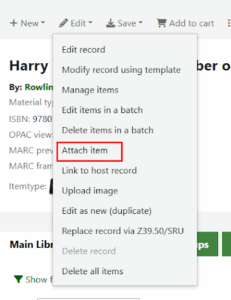
Attach Items – use this feature (from the Edit menu of a catalogue record) to ‘attach’ an existing copy to this record. If the record you are moving the item from then becomes empty (i.e. it no longer has items attached), then you have the option to delete the record at this time.
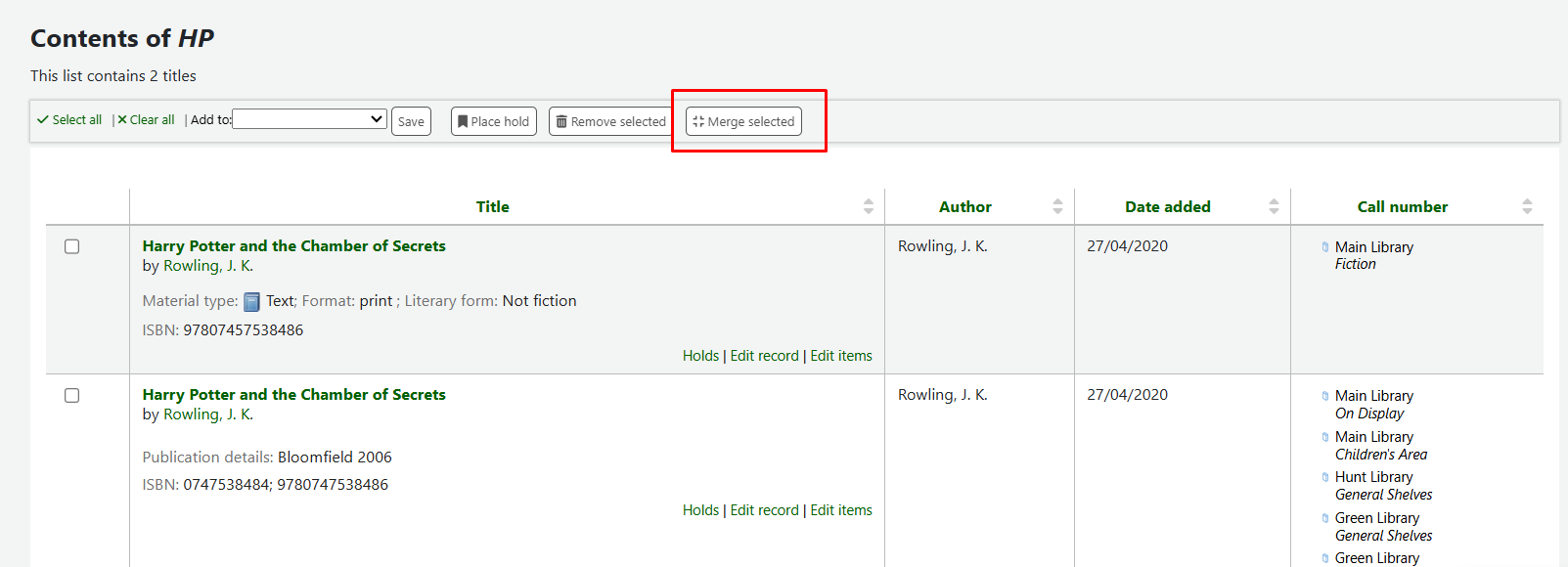
Merge records – from a catalogue search, add items to a list and then you can use the Merge Selected button to perform the merge. At this point you are prompted to select your primary record (the one that will be saved) and can select to remove any unwanted MARC data as part of the process.
Learn more about Koha, the open source library management software used in over 18,000 institutions globally.
Subscribe to the Open Fifth YouTube channel for regular video updates, how-tos, and information on Koha, Aspen, and other open source library software new features.