

What’s on our mind: Mastering Aspen Discovery bug severity levels in Jira
Last updated on: 11th September 2025| 13th August 2025 | Alexander Blanchard | Aspen Discovery
Understanding bugs, questions and enhancements
In Jira, issues are categorised as follows:
- Bug: A problem that causes Aspen Discovery to behave unexpectedly or incorrectly.
- Enhancement: A request for a new feature or an improvement to existing functionality.
- Question: An inquiry seeking clarification about Aspen Discovery’s functionality. Questions are reviewed each fortnight by Aspen’s triage group.
Aspen Bug Severity
The Aspen Bug Severity field is specifically designed to gauge the impact of bugs on the Aspen Discovery system. Since enhancements and questions do not reflect incorrect or unexpected behaviour in Aspen Discovery, we do not need to assign them with a severity level. Assigning a severity level to bugs helps teams to prioritise them effectively.
Why severity matters
Providing the severity level helps teams prioritise issues effectively and focus on what impacts libraries most. Aspen’s Bug Triage group meets fortnightly to review bugs that have been submitted via Jira. During these meetings, bugs that have been given a severity level of ‘I don’t know’ are reviewed by the team and given a new severity rating. Any questions submitted are also addressed. In addition, any bugs marked as Major or Critical are discussed so that next steps can be established and the bugs can be fixed as soon as possible.
By taking a moment to accurately select the severity level when reporting bugs, you help to ensure that the most critical issues receive the attention they deserve. Remember, if you are ever unsure, choosing ‘I don’t know’ brings the bug to the attention of the Aspen Bug Triage team and allows them to step in and assign the appropriate severity level.
Want to learn more about how Jira is used for Aspen Discovery? Check out these posts:
What severity level is my bug?
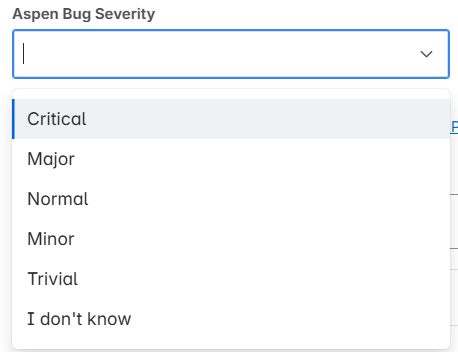
Above, you can see the available severity levels for Aspen bugs. Selecting the correct severity level helps to guide support companies in understanding how urgently the bug needs to be fixed.
- Critical: These are the most severe bugs and can render the system unusable. An example may be users being unable to log in to the system.
- Major: These bugs may not completely disable core functionality but do impact it. They may impede users from performing critical tasks. An example may be the inability to create or update user accounts.
- Normal: These bugs impact non-critical functionality, but they do not prevent the software from being usable. An example may be advanced search filters not working as expected.
- Minor: These bugs are minor annoyances that do not normally impact functionality. An example may be tooltips displaying with unclear text.
- Trivial: These are cosmetic issues. An example may be minor misalignment of an icon that does not impact its functionality.
- I don’t know: You are unsure how to rate the severity level and would like someone from the Aspen Bug Triage group to rate it.