

What’s on our mind: Deep diving into Koha notice templates with Template Toolkit
Last updated on: 5th May 2026| 16th April 2026 | Martin Renvoize | Koha
If you’ve ever stared at a notice asking, “How do I get the patron’s home branch name instead of the code?” or “Why does this loop work in the checkout receipt but not the overdue notice?”, this post is for you.
We are going to go beyond the basics. We are going to look at how to use Template Toolkit (TT) syntax, but more importantly, we are going to learn how to “code dive” to find the hidden variables available to your notices.
Part 1: The basics (A quick refresher)
Before we break things, let’s review the syntax. Koha uses Template Toolkit (TT) for notices. This allows for logic, loops, and data processing directly in the email or slip.
Printing variables
To display data, wrap the variable name in square brackets and percent signs.
Hello [% borrower.firstname %],Conditional logic
Don’t send a “Please call us” line if the library doesn’t have a phone number. Use IF statements.
[% IF branch.branchphone %]
    Give us a call at [% branch.branchphone %]
[% END %]
Filters
TT can format data for you. Need to capitalise a name or format a price?
[% borrower.surname | upper %] [% amount | $Price %]Some useful Template Toolkit filters
Template Toolkit includes many powerful filters that can transform data right within your notice template. Here are a few core filters highly useful for Koha notices:
- upper, lower
- Purpose: Converts text to all uppercase or all lowercase.
Example usage:
[% borrower.surname | upper %]Output example: SMITH
Context: Name field
- trim
- Purpose: Removes leading and trailing whitespace from a string.
Example usage:
[% item.description | trim %]Output example: “A Great Book”
Context: Item description or title
- html
- Purpose: Escapes special characters into HTML entities for security and correct display.
Example usage:
[% item.title | html %]Output example: <Escaped Title>
Context: Any text that might contain HTML/XML
- url
- Purpose: URL-encodes a string (e.g., spaces become %20).
Example usage:
[% item.title | url %]Output example: Title%20with%20spaces
Context: Creating URL query parameters
- default
- Purpose: Provides a fallback value if the variable is undefined or empty.
Example usage:
[% item.notes | default('No notes provided') %]Output example: No notes provided
Context: Optional fields
- remove
- Purpose: Removes all occurrences of a specified substring.
Example usage:
[% item.publisher | remove('Publishing Co.') %]Output example: McGraw-Hill
Context: Standardising publisher names
- replace
- Purpose: Replaces occurrences of one substring with another.
Example usage:
[% item.location | replace('STACK', 'Main Floor') %]Output example: Main Floor 100-200
Context: Reformatting cryptic location codes
Note on date/time filters: While TT has its own date filters, Koha often provides its own specialised date filters (like $KohaDates or $KohaTime) specifically configured to respect system preferences.
Part 2: The deep dive (Finding the hidden data)
This is the most common frustration: “What variables can I actually use?”
The Koha wiki has some lists, but they are often incomplete. The only source of truth is the code itself.
Step 1: Identify the notice code
Go to Tools > Notices and Slips. Find the notice you are editing and grab its Code.
- Example: Let’s look at the
CHECKOUT(Checkout) notice.
Step 2: Search the codebase
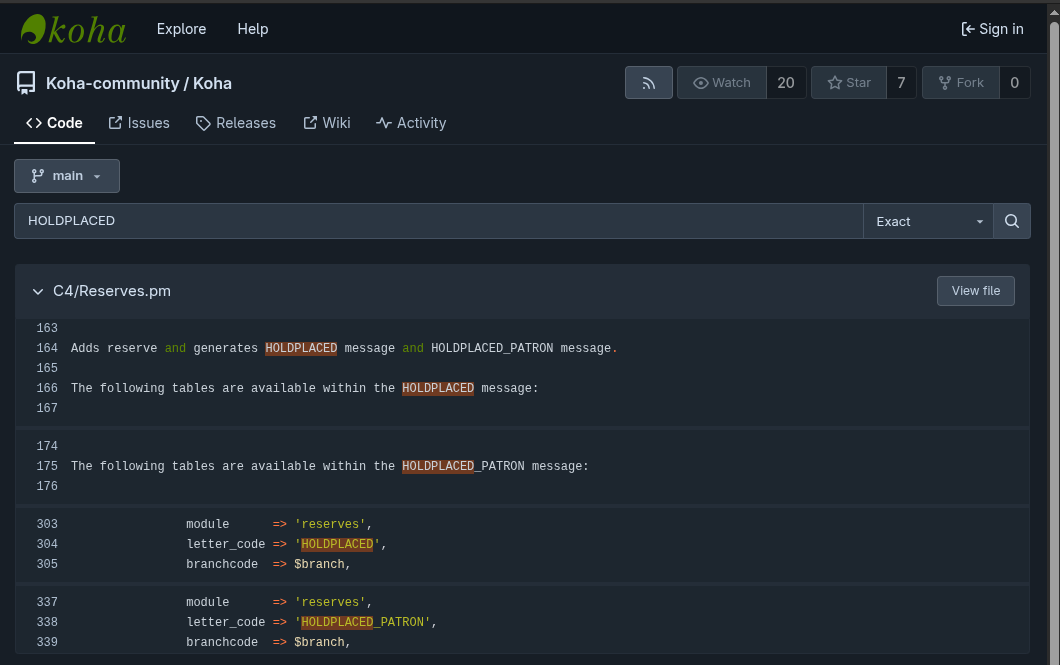
Go to the Koha Community Git Browser. You are looking for the Perl script that triggers this notice.
- Search query:
GetPreparedLetter(or your notice code like'ODUE'). - Where to look:
- For circulation notices:
C4/Circulation.pmorcirculation.pl. - For overdues:
misc/cronjobs/overdue_notices.pl. - For holds:
C4/Reserves.pm.
Step 3: Analyse the tables and substitute
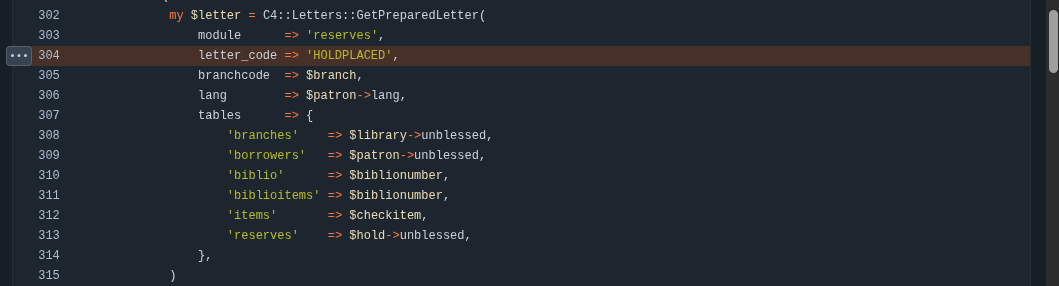
Once you find the relevant call to
GetPreparedLetter, look at the arguments passed to it. It usually looks something like this:my $letter = C4::Letters::GetPreparedLetter( module => 'reserves', letter_code => 'HOLDPLACED', branchcode => $branch, lang => $patron->lang, tables => { 'branches' => $library->unblessed, 'borrowers' => $patron->unblessed, 'biblio' => $biblionumber, 'biblioitems' => $biblionumber, 'items' => $checkitem, 'reserves' => $hold->unblessed, }, substitute => { today => output_pref(dt_from_string) } )Here is your treasure map:
-
- tables: These are database tables. If you see
'borrowers' => $borrower, it means the system is fetching a row from theborrowerstable.- Translation: You can usually access any column in that table using
[% borrower.column_name %].
- Translation: You can usually access any column in that table using
- tables: These are database tables. If you see
- substitute: These are custom variables or arrays.
- Translation: If you see
'today', you can use[% today %].
- Translation: If you see
Step 4: The C4::Letter variable mapping
How does the Perl object
$borrowerbecome[% borrower.firstname %]?If you look at
C4::Letter.pm, specifically the_get_tt_paramsfunction, you will see how Koha maps these. It iterates over the keys in thetableshash.- It takes the table name (e.g.,
borrowers) and uses it as a prefix. - It takes the column name (e.g.,
surname) and appends it. - Result:
[% borrowers.surname %](Note: notice syntax sometimes aliases this to the singularborrowerdepending on context, which is why testing is key).
- For circulation notices:
Part 3: Looping through relations
The most powerful part of TT is looping through related data, like a list of overdue books.
If you saw an array reference in the code (like \@items in the example above), you can loop over it.
<h3>You have the following items checked out:</h3>
<ul>
[% FOREACH item IN items %]
    <li>
        <b>[% item.title %]</b>
        (Due: [% item.date_due | $KohaDates %])
        <br/>
        Barcode: [% item.barcode %]
    </li>
[% END %]
</ul>
The “object” advantage
In newer Koha versions, developers are passing Koha::Objects rather than simple hashrefs. This is a game changer.
If the code passes a Koha::Patron object as borrower, you aren’t limited to just the columns in the borrowers table. You can potentially chain relation method calls if the template context allows it.
- Example:
[% borrower.category.description %] - Here, we are jumping from the Patron object to the related Category object to get the description, all without writing a complex SQL join.
Part 4: Why is this so hard? (And a proposal)
You might be thinking, “Why do I have to read Perl code just to write an email?”
It is a fair question. The difficulty lies in Context. A generic “list of variables” is impossible because the CHECKOUT notice has access to items, but the PASSWORD_RESET notice does not. The data is prepared dynamically at the moment the event happens.
The dream: No more code diving
Imagine a system where developers explicitly declare the “Data Contract” for every notice.
- Developer side: When writing the Perl code, they define: “This notice provides a Patron Object and a list of Item Objects.”
- User side: The Notice Editor reads this contract and gives you a sidebar with a tree-view of available variables. You click “Patron > First Name” and it inserts
[% borrower.firstname %].
Call to action
This level of transparency requires refactoring how Koha handles data passing in notices. It’s not as simple as a UI update; it requires backend plumbing to standardise how data is exposed to templates.
However, the payoff would be massive: simpler customisation, fewer bugs, and no more reading C4::Letters.pm on a Friday afternoon.
Is this something that would save your library time? Features like this often come to life through community sponsorship. If you want to make notice writing easier for everyone, consider raising this on the mailing list or sponsoring a developer to tackle the “Notice Data Contract” project!