
What’s on our mind: Reports – what do we mean by ‘activity’ on Koha?
Last updated on: 27th May 2026| 27th May 2026 | Lucy Vaux-Harvey | Koha
This is a question that comes up regularly during our Koha implementation projects and also on the Helpdesk. It is important to be able to measure activity accurately for all types of reasons, from service planning, resource allocation to data retention policies. But what constitutes ‘activity’ and how do you report on it consistently in Koha?
A common scenario springs to mind as illustration: You might have a patron who never borrows physical items but regularly accesses your e-content platforms. This is a valuable patron, you want to be able to record this service use and you certainly wouldn’t want to delete this user inadvertently just because they haven’t borrowed a book in a while.
This post gives a bit of background on the data tables and settings that are commonly used to report activity and some of the things to look out for when using the different methods.
TrackLastPatronActivityTriggers and the <lastseen> patron field
I would say using this system preference is definitely the ‘go to’ approach for defining activity in Koha today. (It wasn’t always the case as I will explain a bit later on).
The TrackLastPatronActivityTriggers system preference allows you to define what actions update the ‘lastseen’ field in the patron record and therefore count as activity. You will see from the screenshot below the range of actions includes physical borrowing transactions but also different methods of login and authentication.
If we go back to our scenario, these options are the important ones for recording online activity:
-
- Connecting to Koha via SIP or ILSDI – includes login to library e-content platforms and use of library PCs if this authenticates via Koha.
- Patron authentication via API – includes login to a library app or discovery platform such as Aspen.
Koha can connect to online platforms in a variety of ways but ticking these two options should cover most configuration carried out by Open Fifth. Check with us through the Helpdesk if you need more details.
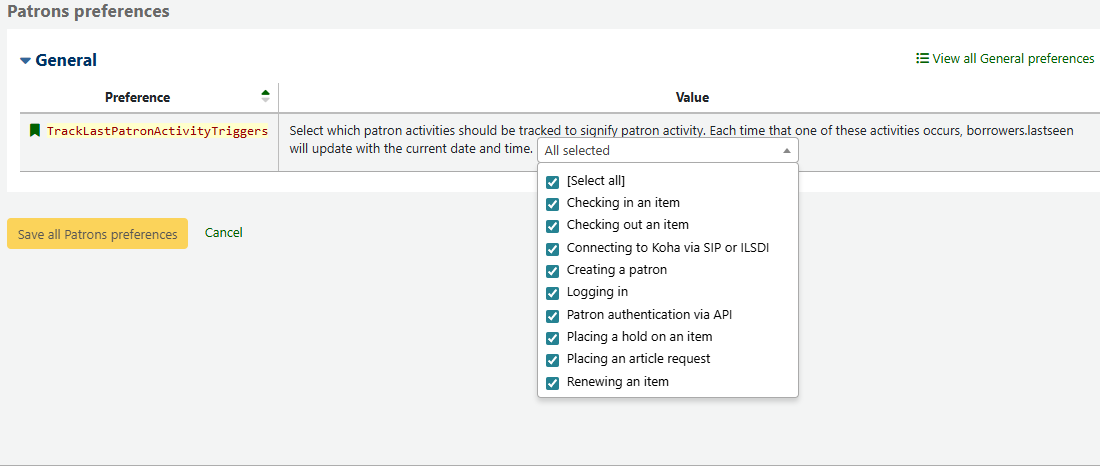
If you already use this preference bear in mind that new options won’t be automatically ticked at upgrade so you may want to review it periodically. An example of a new option being considered is ‘Placing an ILL request’, covered in bug 37195.
Below is an example of a report using the lastseen field to identify patrons who have shown no activity in the past 12 months.
SELECT
    borrowers.cardnumber AS 'Cardnumber',
    borrowers.firstname AS 'Firstname',
    borrowers.surname AS 'Surname',
    borrowers.categorycode AS 'Category',
    borrowers.lastseen AS 'Last seen date',
    borrowers.email AS 'Email'
FROM borrowers
WHERE (borrowers.lastseen < DATE_SUB(CURDATE(), INTERVAL 12 MONTH))
ORDER BY borrowers.lastseen DESC
An alternative could be to substitute the WHERE clause to retrieve patrons who do have activity, this time within a date range.
WHERE (DATE(borrowers.lastseen) BETWEEN <<Has activity between|date>>
AND <<and|date>>)
What other options are there for reporting on activity?
As I mentioned above TrackLastPatronActivityTriggers hasn’t always been comprehensive. The options have been added over time as background logging is developed. If you have been using Koha for a while you may have reports that piece together data from other tables in order to meet your needs. The reports could be using:
- issues and old_issues tables – these tables record current and past check outs and renewals only. Throw in reserves and old_reserves to include holds/reservations. This is quite a narrow definition of activity for most libraries today.
- statistics table – this table collates selected transactional data from Koha. It strips out patron data so it is anonymous and doesn’t rely on a patron or item record being retained in order to run reports. Notice I say ‘selected’, you are limited to reporting against specific transactions such as: local use of resources, check out, check in, renewal, writeoff and payment of charges.
Scanning through the reports added to the Active Patrons section of the Koha Reports Library shows you the range of approaches on offer!
It’s important to note that although using TrackLastPatronActivityTriggers seems the obvious choice, there is no need to make any changes if current reports give you the figures you need. And remember, if you start reporting activity in a different way you may have to explain any sudden change in the figures, so keeping things consistent is a valid consideration.
Whether you are new to reporting on library activity or simply want to review that your current reports are properly defined, I hope the above gives some insight.
Blog post featured image: Cyathea dealbata by Krzysztof Ziarnek, Kenraiz published under the Creative Commons Attribution-Share Alike 4.0 International license. (Source: Wikimedia Commons)